
Send email from your own domain
Out of the box, your marketing emails come from your store's name at noreply@send.pixvend.com. Verify your own domain and they come from your own address, land in more inboxes, and build a sending reputation that's yours alone.
Included with Email Marketing and Email Marketing + Automation. 3 steps. Last checked October 9, 2026.
Watch the whole process (1:04, captions on)
Step 1 of 3
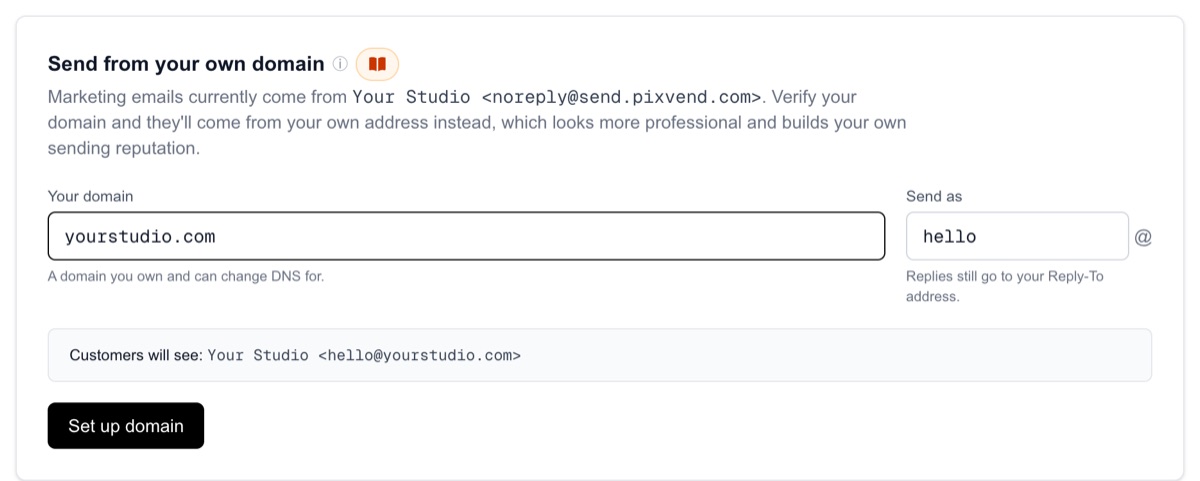
Type your domain
YouSettings, then Email Settings. Send from your own domain is on that page.
Your domainA domain you own and can change DNS for, for example yourstudio.com. Free addresses like gmail.com can't be used.
Send asThe part before the @, for example hello or photos. The preview shows exactly what customers will see.
Set up domainPixVend creates your records. Your emails keep going out from noreply@send.pixvend.com until the domain is verified, so nothing breaks while you wait.
Next: step 2
Step 2 of 3
Add the records at your DNS host
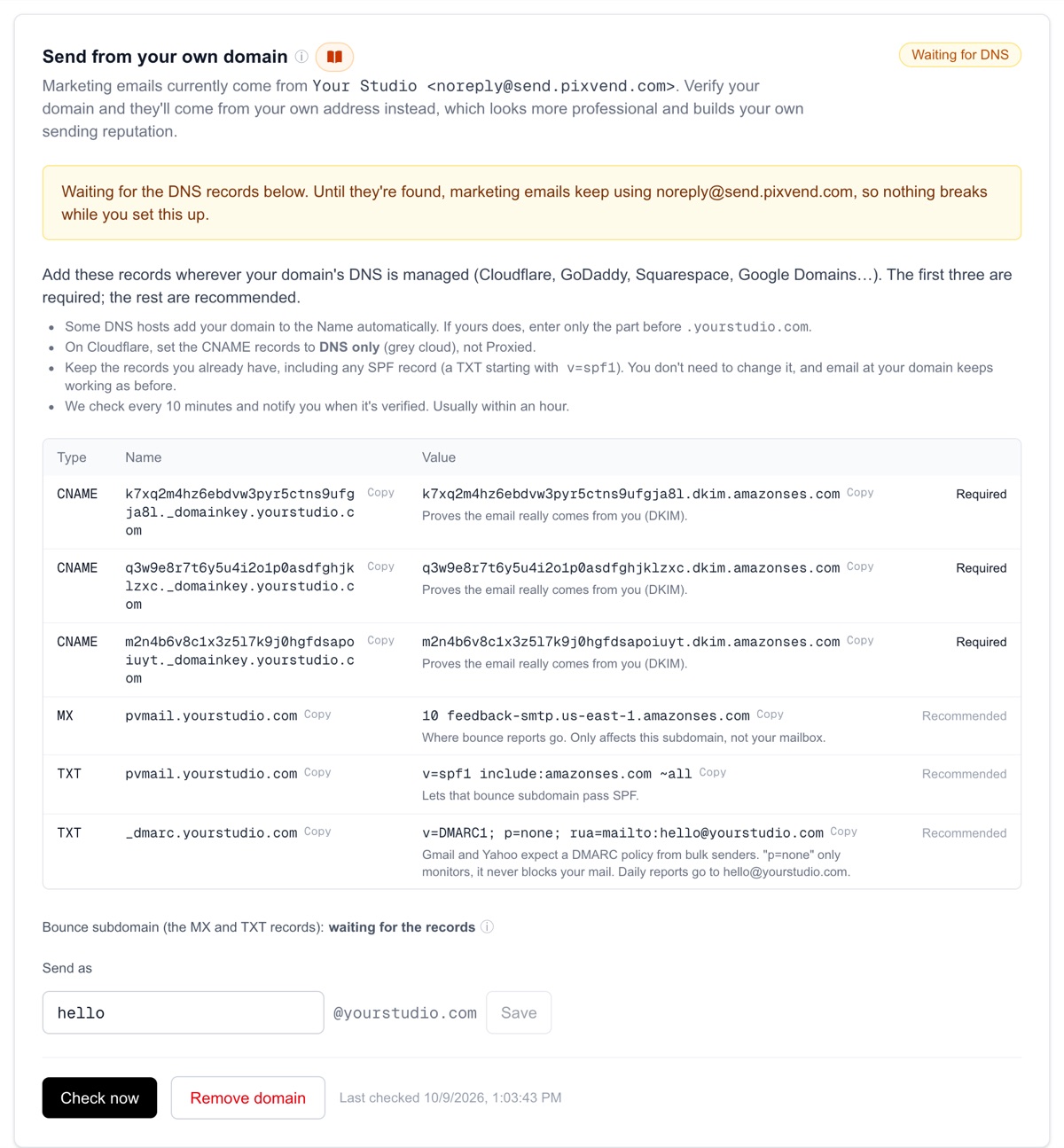
YouOpen the DNS settings wherever your domain is managed (Cloudflare, GoDaddy, Namecheap, Squarespace...) and add each record from the table. Press Copy next to a name or value to copy it exactly.
Three CNAME records (required)They prove the email really comes from you (DKIM). These three verify your domain.
MX and TXT for pvmail (recommended)A small bounce subdomain, pvmail.yourstudio.com, where bounce reports go. It only affects that subdomain, never your mailbox, and lets your mail pass SPF under your own domain.
DMARC (recommended, only if you have none)Gmail and Yahoo expect a DMARC policy from senders. p=none only monitors; it never blocks your mail. If your login email is on this domain, daily reports go to it; otherwise the record asks for no reports.
On Cloudflare, use the grey cloud Set the three CNAME records to DNS only (grey cloud), not Proxied. A proxied CNAME hides the value Amazon checks, so the domain never verifies.
Keep your SPF record as it is If your domain already has a TXT record starting with v=spf1, leave it alone and don't add a second one. You don't need to change it, and your email keeps working exactly as before. The same goes for your MX records.
If the Name already ends in your domain Many DNS hosts add your domain to the Name for you. If yours does, enter only the part before .yourstudio.com, for example abc123._domainkey or pvmail.
Next: step 3
Step 3 of 3
Wait for Verified
YouPixVend checks every 10 minutes and emails you when it's done, usually within an hour. Press Check now to look straight away.
- Waiting for DNSThe records aren't visible yet. Your emails use noreply@send.pixvend.com in the meantime.
- Not verifiedPixVend looked and couldn't find the three CNAME records. Check they match the table exactly, then press Check now.
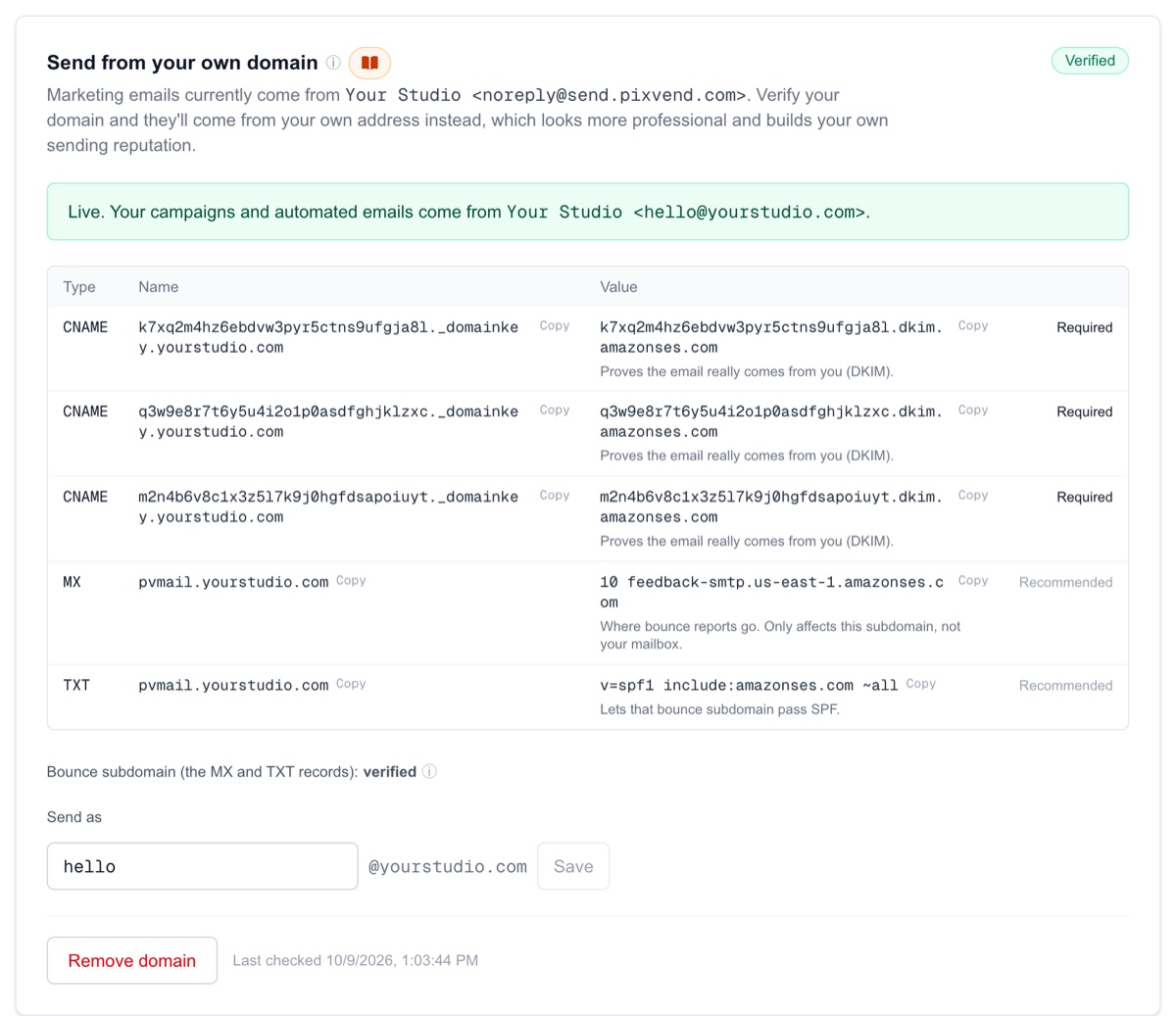
- VerifiedYour campaigns and automated emails now come from your own address.
The bounce subdomain line Under the table, the bounce subdomain shows verified, waiting for the records, or not found yet. It's optional: until it's found, bounces use Amazon's default and your mail still goes out.
Why it's worth doing
Customers see hello@yourstudio.com, an address they recognise, instead of a PixVend one.
Gmail and Yahoo trust mail signed by the domain in the From line. Signed, aligned mail is less likely to land in spam.
Without your own domain you share send.pixvend.com with other stores. With it, your results depend only on your own list.
What changes Campaigns, journeys and automated marketing emails (gallery alerts, deadline reminders, abandoned carts, review requests). Order receipts and download links keep coming from PixVend. Replies still go to your Reply-To address.
If a record is stuck
The most common slip is the domain twice, like abc123._domainkey.yourstudio.com.yourstudio.com. Remove the repeated part.
The three CNAMEs must be DNS only (grey cloud).
Use Copy in the table rather than typing it, and make sure no space or full stop sneaked in at the end.
Most DNS hosts update within minutes; a few take a few hours.
Remove domain, then set it up again for fresh records. Delete the old records at your DNS host too.
Good to know
- Will this affect the email I already get at my domain?
- No. Nothing here touches your MX records or mailbox. The pvmail subdomain only receives bounce reports.
- Does my store need to be on my own domain too?
- No, the two are separate. To use your domain for your store, see Connect your own domain.
- Can I change the Send as address later?
- Yes, any time, without new records. Save the new name and the next email uses it.
- What if I remove the domain?
- Emails go back to noreply@send.pixvend.com. To use the domain again later you verify it again with new records.
Questions about Send from your own domain? Email support@pixvend.com.
Open Send from your own domainAll guides